How Forex Signals Work: A Step-by-Step Guide
A forex signal is a ready-made trade plan.


How a GBP/USD signal looks
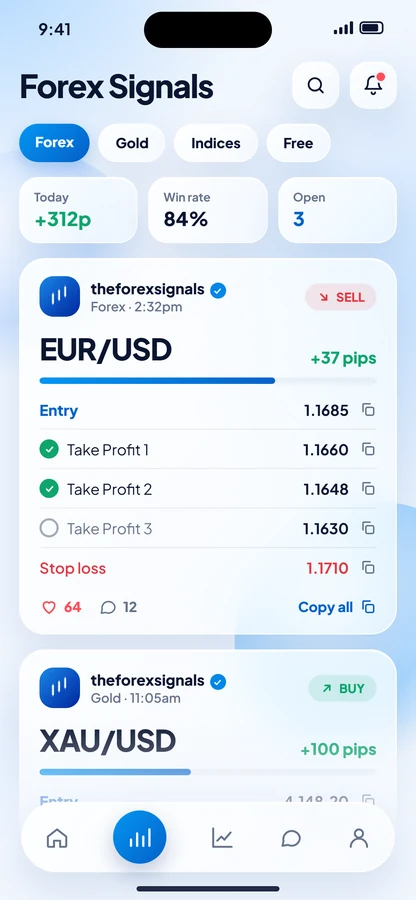
Entry, stop loss and three take profits. You get an alert as each target is hit.
- Signal postedLevels arrive instantly in the app.
- Place the tradeSize it with the lot size calculator.
- Follow the alertsTP1, TP2 and TP3 updates in real time.

Illustrative example only, not a real or past signal. Real signals are posted live in the app with the same layout.
How Forex Signals Work: the essentials
Forex signals in one sentence
A forex signal tells you what to trade, which direction, where to get in, where to get out if you are wrong and where to take profit if you are right. Everything else - analysis, timing, chart work - has already been done by the analyst who posted it.
Understanding how forex signals work is the key to using them well. Signals are not magic; they are structured trade ideas. The traders who do best with them are the ones who follow the plan, size the trade properly and accept that some trades will lose.
How a signal is made
- Analysis - an analyst studies trend, market structure, key levels and upcoming news.
- Setup - when price reaches a level that fits the strategy, a trade plan is built with entry, stop loss and targets.
- Distribution - the signal is posted to the app and members receive a push notification.
- Management - updates are posted as take profits are hit, and the final result is recorded on the Results page.
Anatomy of a forex signal
| Part | Meaning |
|---|---|
| Pair | The market, e.g. GBP/USD. The first currency is the base, the second is the quote. |
| Direction | BUY if price is expected to rise, SELL if it is expected to fall. |
| Entry | The price to open the trade. Some signals use the current market price. |
| Stop loss (SL) | The exit if the idea is wrong. It defines your maximum loss. |
| Take profit (TP1, TP2, TP3) | Staged targets where you bank profit. |
A worked example
Imagine a signal: GBP/USD BUY at 1.2700, SL 1.2670, TP1 1.2720, TP2 1.2740, TP3 1.2770. The stop is 30 pips below entry, so your risk is 30 pips. TP1 is 20 pips away, TP2 40 pips and TP3 70 pips. The figures are illustrative only. See our GBP/USD signals page for more on this pair.
Step 1: decide your risk
Before you look at lot size, decide how much of your account you are prepared to lose on this one trade. Many professionals risk 1-2%. On a £1,000 account, 1% is £10.
Step 2: work out the lot size
Divide your risk by the stop loss distance in pips and by the pip value. With a 30-pip stop and £10 of risk you can afford about £0.33 per pip. On GBP/USD that is roughly 0.04 lots for a GBP account. You do not need to do this by hand - our lot size calculator does it instantly, and the pip calculator shows the value of each pip for any pair, including gold.
Check your margin
Leverage means you only put up a fraction of the trade value as margin. Use the margin calculator to make sure you have enough free margin, especially if you hold several trades.
Step 3: place the trade with SL and TP
Open your trading platform (MetaTrader or similar), select the pair, choose buy or sell, enter the lot size and type in the stop loss and your first take profit. Always enter the stop loss at the same time as the trade - never plan to add it later.
Prices differ slightly between brokers
Each broker has its own feed, so the price on your chart may be a few pips different. If price has already moved well past the entry, it is usually better to skip the trade than to chase it.
Frequently asked questions
An analyst builds a trade plan with pair, direction, entry, stop loss and take profit levels and posts it to members. You receive it as a notification, size the trade to your risk and place it on your own platform.
SL stands for stop loss - the price where the trade closes automatically to limit your loss if the market moves against you. It should always be placed when you open the trade.
They are staged take profit levels. TP1 is the nearest target, TP3 the furthest.
Many professionals risk 1-2% of their account per trade. Decide your risk first, then use the lot size calculator with the stop loss distance to find the right position size.
If price has moved only slightly, the trade may still be valid. If it has moved a long way towards the first take profit, the risk-to-reward is worse and it is usually better to wait for the next signal.
Yes, and we recommend it for beginners. A demo account lets you practise placing trades, setting stops and managing take profits without risking real money.